I’ve been enjoying participating in Sonel’s Photo Editing Challenge each week, and thought I’d share this helpful post from the WordPress Daily Post.
*********************************************************************************
A World Through Lo-Fi: Using Filters on Your Images
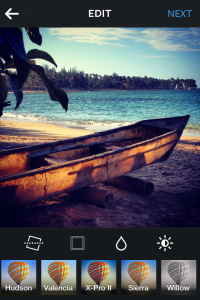 Earlier this month, we discussed cropping as a quick fix to your images. Since Instagram, Hipstamatic, and similar photo apps and editors are so popular, let’s talk about using the filters on these types of tools, too. If you’re already using filtered images on your blog, or if you’re wondering if it’s worth experimenting with, dive in.
Some photographers would rather not use instant effects, like Instagram’s popular Earlybird and Lo-Fi filters, at all. In some cases, you might take a perfectly fine photograph and taint it with unnecessary saturation and contrast (which Leanne Cole touched on in her editing tutorial).
Or, if you run a 1970s retro filter (like Instagram’s Walden) over a picture, you might like the dreamy effect, but in doing so may have decreased the quality and clarity of the image. So, take our suggestions if they’re fit for your work and style. Ultimately, remember: using filters can be fun, and if used with care, can kick up your photos a notch.
EXPERIMENTING WITH FILTERS
Editing a photograph depends on a number of factors, from the mood and style you’d like to achieve to how the image will be displayed on your blog (on its own, within a gallery, as a thumbnail, or in full size). You might want to do heavy editing over your image, especially if you’re going for a dramatic or abstract feel, or you may want to keep it light, simply to sharpen or make the colors pop a bit. The size of the image, and the context in which you’re displaying it, might also affect what you do with it.
Consider this photograph, taken in the harbor of Monterey Bay in Central California:

The big empty space in the upper part of the frame creates an unusual composition, while the colors on the boats — especially the bright blue — add nice details. Compare several filtering options, done in Instagram:


Sometimes people go filter-crazy! In the left image, I used Kelvin, which creates an over-saturated look with warm and orange hues. Sometimes it works well, and other times, it ruins the image. In this case, I miss the smooth, calm surface of the sea in the original photo.
The center image uses the Toaster filter — marked by its dramatic vignette effect. The filter creates an aged, burnt quality, reminiscent of faded film photographs in your grandmother’s family albums. The effect looks great on images you want to purposely age, but I’m not sure it works here: the vignette is distracting and doesn’t add anything to the original — there’s no need to make it look old.
Finally, on the right, I didn’t add a filter but instead used Instagram’s Lux tool — the sun symbol on the right in the app’s editing screen — to give it an extra boost.

You can use the Lux tool to brighten an underexposed or low-contrast image. Sometimes, it can improve an image dramatically, adding highlights, sharpening details, and making colors pop a bit more. In the right image, you can see the Lux tool bumped up the contrast a bit, while making the ripples in the surface of the water more pronounced. The effect is more subtle than the other two.
USING FILTERS TO ENHANCE — NOT TO DRASTICALLY CHANGE
Take a look at this image, snapped along Sonoma County’s Russian River in Northern California:

The foliage and reflections on the water might be lovely as is, but what happens if we played with filters a bit?


Photo apps and online editors — from Instagram to Photoshop Express to PicMonkey — let you transform a color image into black and white. On the left, I used the Willow filter, one of Instagram’s two black and white options. While I love black and white images, this filter completely strips the life from the original image — the forest’s shades from green to gold were the photo’s strength. Now, it feels flat.
In the middle, the Kelvin filter has once again brightens the photo, but the tones are off, creating unnatural hues in the tips of the trees and a frosty effect on the foliage along the riverbanks. When choosing filters, pay attention to the look and feel — it’s easy to manufacture a completely different mood. Sometimes that may be your intention, but as a general rule, use a light editing hand. Oftentimes, less is more.
The image on the right, using the Mayfair filter and the Lux effect, is a better balance: it brings out the golden hues in the treetops, but also emphasizes the greens along the riverbank, creating a variety of colors in the frame. Overall, the contrast is increased, which also brings out the details.
You might prefer the original instead — and when it comes down to it, there’s no clear-cut right or wrong way to use filters. Overall, think about the mood you want to convey, and always compare your originals to your edited versions.
Quick takeaways:
- For artsy and abstract, to make architectural images sharp, or to define shapes and lines, try black and white.
- For warm and bright, or to mimic a faded retro effect, use yellow and orange hues.
- To keep an image cool, go for filters that look green and blue.
- Use Instagram’s Lux button (or similar contrast tool) first to see if it helps — sometimes that’s all you need.
via A World Through Lo-Fi: Using Filters on Your Images | The Daily Post.


 Travel with Intent
Interesting! And btw, I loveeeeeee the forrestphoto, makes me feel so small!
LikeLike